TransForm Data Viewer Properties
Description
A complete reference of configuration settings, templates, CSS, and events for the TransForm Data Viewer control, including property dependencies.
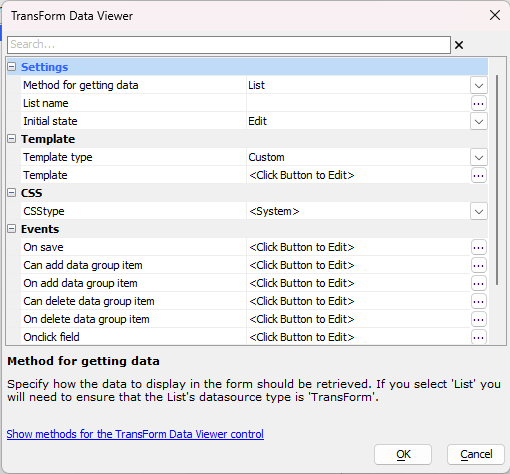
Settings
General configuration for retrieving and displaying TransForm data.
Method for getting data
Specify how the data to display in the form should be retrieved. Options include Static, Xbasic, API, or List.
Note: If you select 'List', ensure the List datasource type is set to 'TransForm'.
List name
Specify the name of the List control that serves as the data source.
(This property is only visible when Method for getting data is set to List.)
Initial state
Specify whether the initial state is View or Edit mode when a user taps on a row in the source List.
(This property is only visible when Method for getting data is set to List.)
Arguments
Define arguments passed into the Xbasic or API calls used to retrieve data.
(This property is only visible when Method for getting data is set to API or Xbasic.)
Form definition / Form instance data JSON
Provide the literal JSON strings for the form's structure and data.
(These properties are only visible when Method for getting data is set to Static.)
Xbasic function
Specify the name of the Xbasic function that returns the form definition and data.
(This property is only visible when Method for getting data is set to Xbasic.)
API key / Form instance id
Specify the TransForm API key and the specific ID of the form instance to display.
(These properties are only visible when Method for getting data is set to API.)
Template
Control the layout of the form data using Alpha Anywhere templating syntax.
Template type
Select <System> to use the default TransForm layout or Custom to provide your own.
Template
Define the custom template using Alpha Anywhere templating syntax.
(This property is only visible when Template type is set to Custom.)
CSS
Customize the visual styling of the Data Viewer.
CSStype
Select <System> for standard TransForm styling or Custom to provide a custom style sheet.
CSS
Enter the custom CSS definitions to be applied to the form.
(This property is only visible when CSStype is set to Custom.)
Events
Client-side Javascript events triggered by user interaction.
On save
Javascript to execute when a user saves edits, typically via the .saveEditedRenderedFields() method.
Can add/delete data group item
Validation events that fire before a group item is modified. Return false to abort the action. Your code can reference the path of the item.
On add/delete data group item
Events that fire immediately after a data group item has been modified.
Onclick field/image/audio
Custom Javascript triggered when a user clicks on specific data types (text fields, images, or audio recordings) within the viewer.
See Also